Status
Not open for further replies.

Neo_Angelo

Customer
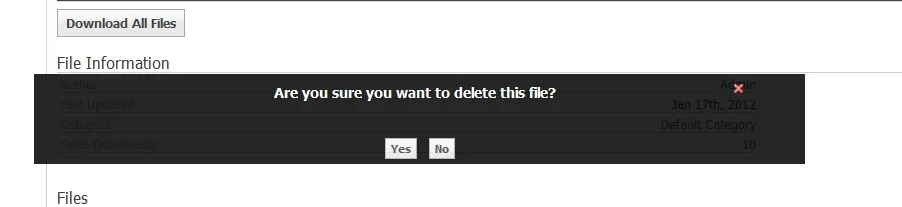
Just a head up when the pop-up message shows to confirm you want to delete your file/download the message box pops-up miles above the actual download so you have to scroll up to click it as you can't click it straight off the bat after clicking remove file. Not so much of a bug as more of a re-positioning as it works but its more of an annoyance as it pops up to the top of your site rather than the center of your screen.
 
Hmm, I see it pretty much right to the right of the delete link. I'll see if I can replicate it though
 
i'm not sure whether its because i'm using a large screen or not but the message pops up and moves the the very top of the page in the centre of the scree, i thought it was just supposed to pop up in the middle of your scree where ever you were just scrolling and would move up and down as you scroll but it doesn't on my site for some reason.
 
How big are you running? I'm at 1920x1080 and it looks fairly centered on the screen to me. A bit to the left and a bit up from center, right under the File Information title

delete.webp

It is true that it doesn't move as you scroll up and down while it's active.
 
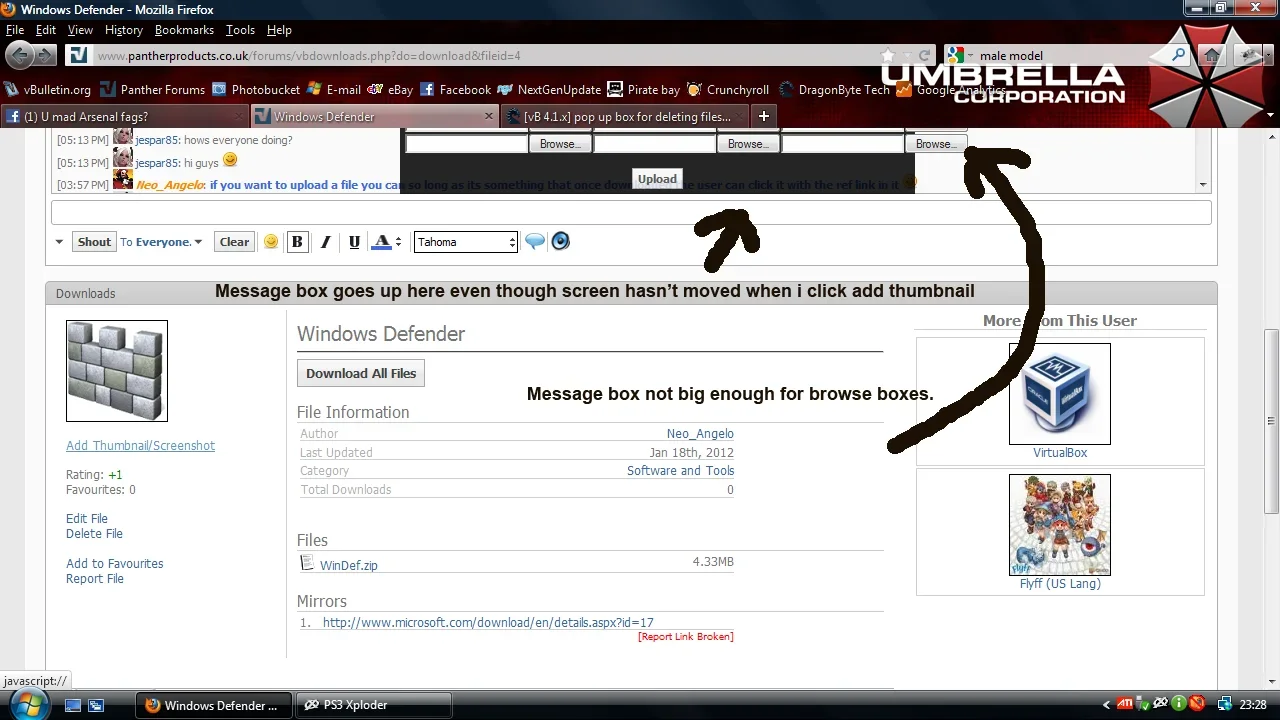
i'm also running on 1920x1080 apparently and on mine the pop-up box justzooms up to the top of the page. if you want to try and see if it does it through my site i can hit ya with a login, try and upload/edit a download and you'll see what happens on my site. www.pantherproducts.co.uk/forums/vbdownload.php anytime that box shows up it goes to the top, also the bit where it says upload screenies and thumbnails the message box isn't bit enough. ill screenshot them when i click it.
 

Attachments

  • downloadscreen.webp
    downloadscreen.webp
    87.7 KB · Views: 1
Last edited:
Yeah please give me a login so I can see what's going on.

---------- Post added 3rd February 2012 at 00:02 ---------- Previous post was 23rd January 2012 at 22:02 ----------

Ah, it looks like he has the position hardcoded in and the shoutbox bumps it up. I'll try to change it in the future. For now, you can edit the dbtech/downloads/clientscript/downloads.js
At line 312
Find

Code:
                    to: [400, 300]

and replace with

Code:
                    to: [400, 600]
 
i'll give this ago, thanks :) also BB code seems to show up on the main download page for descriptions but not in the actually download bit, for example when viewing a list of downloads it shous the following
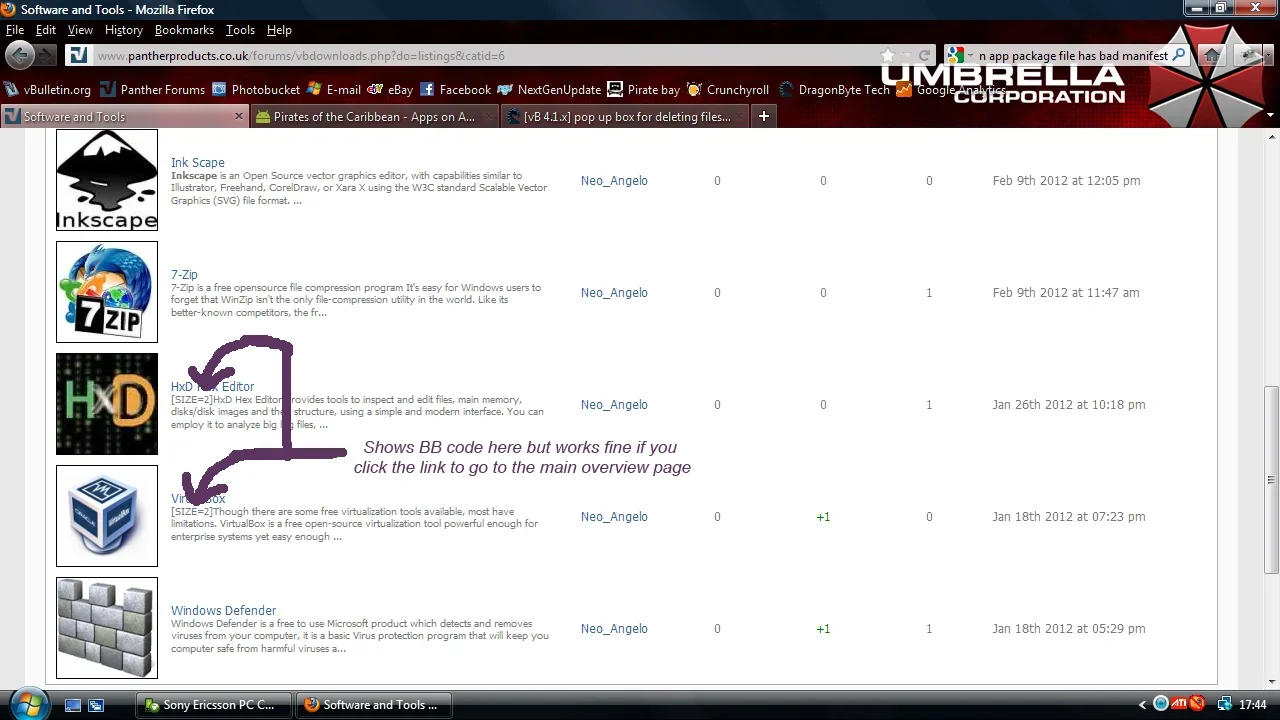
Code:
 [size*=2]description here blah[/size]
yet if you click the download to show its page the BB parses correctly.

EDIT: the fix you gave me worked fine, but i'm just wondering maybe you should make it move as you scroll too so its always in the middle of your screen, only thing now is that the two browse buttons on the third bit are outside of the black box.
 
Last edited:
i'll give this ago, thanks :) also BB code seems to show up on the main download page for descriptions but not in the actually download bit, for example when viewing a list of downloads it shous the following
Code:
 [size*=2]description here blah[/size]
yet if you click the download to show its page the BB parses correctly.

EDIT: the fix you gave me worked fine, but i'm just wondering maybe you should make it move as you scroll too so its always in the middle of your screen, only thing now is that the two browse buttons on the third bit are outside of the black box.

Are you talking about it showing on the right side block? Or somewhere else?

Yeah, in the future I will change it so it will work differently, not a pixel count from the top of the page :)
 
Are you talking about it showing on the right side block? Or somewhere else?

Yeah, in the future I will change it so it will work differently, not a pixel count from the top of the page :)

i've screenshotted it to help you, it also has the same problem on DB-Tech too.

Also i don't know if this is a bug but whenever you edit a file description the enter seems to be removed as in what originally looked like this:

Code:
1.blah blah
2.blah blah
3.blah blah

ends up being

Code:
1.blahblah2.blah blah3.blah blah

this is highly annoying as you then have to press enter twice to make it stay how it originally looked.

It also doesn't allow you to add line breaks to catagory descriptions either, so what should be:

Code:
 This is a catagory description

With a nice space inbetween

Becomes:

Code:
This is a catagory description with a nice space inbetween
 

Attachments

  • screenie.webp
    screenie.webp
    87.8 KB · Views: 2
Last edited:
Ah I see what you mean now. I'll check it out.
The spacing problem when editing is a browser problem. I've seen how that happens with code just making a post as well. Trying to advanced edit a post with lots of code boxes is really annoying heh.

I'll check the multi line cat description as well.
 
i'm using firefox browser with this problem, normally firefox works fine, haven't tested it with other browsers to be fair, i think i get the same problem on Opera mobile too.
 
Status
Not open for further replies.

Legacy vBDownloads

vBulletin 3.8.x vBulletin 4.x.x
Seller
DragonByte Technologies
Release date
Last update
Total downloads
1,717
Customer rating
0.00 star(s) 0 ratings
Back
Top